


A service business paying for Google Ads conversion tracking may see many clicks but still wonder which ads lead to booked work. A click shows interest, not whether someone called, asked for a quote, or hired the business.
That gap matters when ad spend competes with payroll, supplies, and other bills. A local plumber, for example, needs to know which search ads bring genuine inquiries, not just visits from people who leave right away. Useful measurement starts with business outcomes, not every visit to the site.
Choosing the right goal helps a business see whether its advertising supports revenue and a stronger return on investment, or ROI. The guide connects tracked actions to revenue decisions, then explains what Google Ads measures.
Key Takeaways
- Choose a customer action that reflects a real business goal.
- Set up a conversion action with clear rules for counting results.
- Test that the right tag fires after the action succeeds.
- Use realistic conversion values when comparing ad results.
- Check lead or purchase quality before changing campaign budgets.
What Does Google Ads Conversion Tracking Measure?
Google Ads conversion tracking records selected customer actions after an eligible ad interaction. A conversion action is a specific customer activity that Google Ads records as a conversion, such as a purchase or a completed lead form.
Google Ads conversion tracking is a free tool for Google Ads customers with a website and Google Ads account. It records only the actions a business chooses to measure. A user clicks or interacts with an ad, completes the selected action, and the system reports a conversion when it can connect the two.
Google Ads records selected customer actions, not every visit. The business must decide which actions count as conversions.
That chain gives a business more useful data than click totals alone. It can compare campaigns and keywords by the actions they lead to, then adjust its ads or landing pages.
Conversion data can also inform automated bidding, which uses set goals to guide bids. It cannot guarantee more sales. Demand, prices, competition, and the quality of the offer still affect results.
For example, a campaign may bring more conversions but attract people who are unlikely to buy. The business should check whether those actions lead to real inquiries or sales before treating them as success.
Clicks and conversions answer different questions. Clicks show that someone interacted with an ad; conversions show whether a selected action followed. The business must first choose which customer actions matter to its goals.
Which Customer Actions Should Count as Conversions?
A conversion action should represent a real business goal, such as a sale or a qualified inquiry. Page views and cart additions can help diagnose a website, but they should not automatically count as equal to revenue.
Primary outcomes are actions that signal a likely sale or a valuable lead. A submitted quote form from a potential customer may matter more than a page view. Supporting actions can show where people lose interest before they reach that outcome.
The right action depends on how the business sells. A local contractor may value calls and quote requests, while an app business may care about installs and paid use. Google Ads can measure these action types:
| Action type | Example | Where it happens | Useful business signal |
|---|---|---|---|
| Website | Submitted quote form | Business website | Potential customer inquiry |
| Phone | Call to the business | Phone call | Direct customer contact |
| App | In-app purchase | Mobile app | Paid app use |
| Offline | Sale after an ad-led inquiry | In person or by phone | Completed sale |
| Local | Request for directions | Google-owned surfaces | Interest in visiting a location |
Local actions can help a store understand whether people show intent to visit. A direction request still does not prove that someone arrived or bought something, so it may work better as a supporting signal.
Offline conversions can connect an ad-led inquiry with a later sale. That matters for businesses that close work by phone or in person, where the sale may happen after the website visit.
A page view or cart addition may help reveal a problem in the customer path. Use it to diagnose a drop-off, rather than giving it the same weight as a purchase without a clear reason.
Before building a conversion action, the business should name one clear action and decide why it matters. That choice helps keep reports focused on goals instead of easy-to-count activity.
How Does Google Ads Attribute a Conversion to an Ad?
A customer may click an ad, return to the site later, and then complete a purchase. Google Ads conversion tracking works by recording a chosen action and associating it with eligible ad interactions.
Tags and first-party storage can help preserve details needed to connect an ad interaction with a later conversion. Attribution models decide how reported credit is assigned across eligible interactions.
A customer may see an ad, click a second ad, then buy after returning directly to the site. The reported credit depends on the model and the interactions it can observe.
That credit does not mean one ad was the only influence on the sale. It shows how the chosen attribution model assigns credit among eligible ad interactions.
Browser settings and ad blockers can limit what a tag observes. A person’s consent choices can also affect collection. As a result, reports cannot show every step of every customer journey.
These limits make it important to read conversion data as a useful record, not a perfect account of every visit. The tracking method can capture eligible interactions, but some activity may remain unobserved.

Once the business understands how credit is assigned, it can define what Google Ads should count. The next task is creating the conversion action and its rules.
How Do You Create a Conversion Action in Google Ads?
A business creates a conversion action in its Google Ads account by defining its source, purpose, and counting rules. Each action should match one outcome the business wants to measure.
The account path is Goals, Conversions, Summary, then New conversion action. Interface labels can change, but the setup still asks for a source, category, name, and measurement settings.
The source tells Google Ads where the action happens, such as on a website or in an app. The category describes its purpose, such as a purchase or lead. A clear name helps the account owner tell actions apart later.
Choose a goal and conversion category
Select the source that matches where the action occurs. Then choose a category that describes the outcome, rather than the page or button that happens to trigger it.
For example, a completed quote request belongs under a lead goal. A confirmation page view may help mark completion, but the action should represent the submitted form, not any visit to that page.
Set the value and counting rule
A business can assign a fixed value or pass a changing value for each result. A fixed value may suit leads with a known average worth. Purchases usually need a value that matches each transaction.
The count setting affects how repeat actions appear. Choose “One” for leads when repeat submissions by one person should not inflate results; choose “Every” when each purchase matters.
- Choose the source where the customer action happens.
- Select the category that best fits the business goal.
- Name the conversion action so staff can identify it.
- Set its value and choose “One” or “Every.”
- Save the action and note the details needed for tagging.
A lead form may receive repeat submissions from one person, so “One” keeps those from counting as several leads per ad interaction. An online store may choose “Every” because each order is a separate sale.
After saving, keep the action name and any setup details close at hand. Those details help connect the action to the right website tag.
How Do You Install the Google Ads Conversion Tracking Tag With Google Tag Manager?
A basic setup connects the site-wide Google tag to an event-specific conversion tag. The Google tag provides the website foundation, while the conversion tag should fire only after the selected action succeeds.
Google Tag Manager is a tag deployment tool that lets a site owner manage tags without placing each one directly into page code. The Google Ads conversion tag uses a conversion ID and conversion label. Its trigger tells the tag when to fire.
Google’s Google Ads conversions guide for Tag Manager explains the required tag details and testing steps. How to set up Google Ads conversion tracking in Google Tag Manager comes down to linking the site-wide tag, conversion details, and a matching trigger.
Add the Google tag across the website
Open the correct Google Tag Manager container for the website. Add or confirm the Google tag, then set it to load across the pages where the site needs Google measurement.
The Google tag is the site-wide foundation, not the conversion event itself. A purchase or form submission needs its own conversion tag and a trigger tied to the completed action.
Configure the conversion tag and trigger
Create a Google Ads conversion tag in the container. Enter the conversion ID and conversion label from the conversion action, then select a trigger that matches success.
A lead form trigger might rely on a successful submission event or a confirmation page that appears only after submission. A button click alone can fire too early if the form fails or the user changes their mind.
Whether a separate Conversion Linker tag is needed depends on the current Google tag and setup. It is not always required, so check how the container and site already handle ad click information.
Preview, test, and publish the setup
Google Tag Manager offers client-side and server-side tracking routes. Client-side tracking sends data from the user’s browser, while server-side tracking adds a server container between the website and Google Ads.
| Setup approach | Where data is sent first | Main consideration |
|---|---|---|
| Client-side tracking | User’s browser | Browser limits can affect collection |
| Server-side tracking | Web container, then server container | Extra setup is needed before Google Ads |
In a server-side route, data moves from the web container to a server container, then to Google Ads. This approach needs extra setup. Browser restrictions can affect client-side collection.
Use Google Tag Manager preview mode before publishing. Submit a test form or complete a test purchase, then check that the expected conversion tag fires only after success.
Publish only after the test matches the intended action. The phrase Google Ads conversion tracking with Google Tag Manager refers here to this tag-and-trigger workflow. The next choice is how native tracking compares with GA4 imports and enhanced conversions.
Should You Use Native Google Ads Tracking, GA4 Imports, or Enhanced Conversions?
Choose one primary reporting path before comparing tradeoffs. Native Google Ads tracking can suit businesses that want actions configured in Google Ads, while GA4 imports can suit teams that use Google Analytics 4.
Use one primary path for the main conversion goal to make campaign reports easier to read. A business can still collect other data, but counting the same outcome through multiple primary actions can inflate totals.
Compare native tags with imported GA4 key events
A native Google Ads conversion tag records the selected action through Google Ads. An imported key event is a conversion sent from Google Analytics 4, after the business marks an event as a key event and imports it.
| Approach | Where the conversion is configured | Timing or attribution consideration |
|---|---|---|
| Native Google Ads tag | Google Ads and Google Tag Manager | May appear within hours in some setups |
| GA4 import | Google Analytics 4, then Google Ads | Can take 24 to 48 hours to process |
Native conversion data can appear within hours in some setups, while GA4 imports can take 24 to 48 hours to process. Those times are not guarantees; processing and setup can affect when data appears.
GA4 imports can help a team use events it already measures in Analytics. Native tags give Google Ads a direct conversion setup. The best choice depends on the business’s reporting needs and current tools.
Know what enhanced conversions add
Enhanced conversions can send hashed first-party information, such as an email address, to support conversion matching. Hashing changes the data into a protected format before it is sent, but it does not remove the need to handle customer information carefully.
Businesses should collect and use customer data responsibly and with appropriate consent. Google Ads conversion choices should fit the business’s privacy practices and the customer’s expectations.
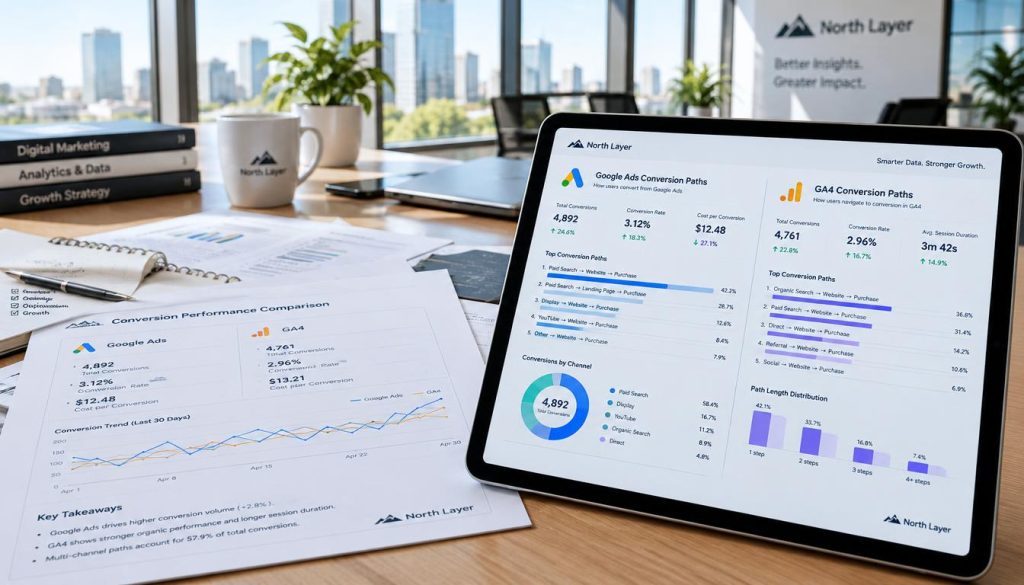
The tracking path should match how the business records its outcomes. Online stores also need to send accurate order values and currency so reported revenue can support sound decisions.
How Should an Online Store Track Purchases and Conversion Value?
A completed purchase is a conversion whose value can change from one order to another. The purchase action should pass the real order value and matching currency.
A store may sell a $25 item in one order and a $180 bundle in another. Passing the actual value lets Google Ads report those sales differently, rather than treating every purchase as equal.
Each purchase should also include a transaction or order ID when the setup supports it. That ID can help identify duplicate purchase events, such as a customer reloading the confirmation page.
Refund checks matter too. A report that counts every original order but ignores returned goods may overstate how much revenue the ads produced.
Google Ads conversion tracking for Shopify depends on the store’s checkout and tracking integration. There is no single set of clicks that fits every Shopify setup, since checkout choices and installed tools can differ.
Google conversion currency settings should match the transaction currency. This matters when a store sells in more than one currency, because the value should reflect the currency used for that order.
A business should test one completed order and check its value, currency, and transaction ID before relying on reported revenue. That simple check can catch a mismatch before it affects campaign decisions.
How Can You Check and Fix Google Ads Conversion Tracking?
A customer may submit a form while the conversion report stays empty. Start with the trigger and tag, then check whether the action has had time to appear.
Newly configured conversions may take around 24 hours to appear. A blank report right after setup does not always mean the tracking is broken.
Confirm the action and trigger match
Check that the trigger matches the successful action, not an earlier step such as a button click. For a lead, confirm that it fires only after a completed submission.
Use this checklist to find common gaps:
- Confirm the trigger matches the successful customer action.
- Check that the Google tag and conversion tag are present.
- Use preview mode to see whether the expected tag fires.
- Review the conversion ID, label, value, and count setting.
- Check repeat events for duplicate conversions.
Check whether the tag fires and data arrives
Google Tag Manager preview mode can show whether the expected tag fires during a test. If it does not, inspect the trigger conditions and any page errors that could stop the event.
Tag Assistant, a Chrome browser extension, can help check tag behavior. There is no separate extension required just to enable Google Ads conversion tracking.
The Google Ads audit checklist for small businesses also covers checking whether forms, calls, and purchases count as meaningful results.
Prevent duplicate or misleading conversions
Review the action’s value and count settings if the reported number looks too high or too low. A tag may fire more than once if a confirmation page reloads or a trigger matches several events.
For purchases, a transaction ID can help identify duplicate events. Other actions may use a conversion ID where the setup supports it, so check how the chosen tag handles repeat events.
Reports may also stay empty if an action does not match the configured source or if the tag sends data to a different conversion action. Compare the details in Google Ads with those in the tag before rebuilding the setup.
Allow around 24 hours for new conversions to appear before treating a delay as a fault. Once the setup passes its checks, the business can use the data to judge cost and revenue performance.
Which Google Ads Metrics Show Whether Your Ads Drive Revenue?
One campaign may bring more conversions, while another creates more value for the same spend. Compare value as well as volume, because a high conversion count alone does not prove the ads are profitable.
Realistic conversion values matter when a business compares revenue with ad cost. These report measures answer different questions about campaigns:
More conversions do not always mean more revenue. Compare what each campaign costs with the value its conversions bring.
- Cost per conversion: Ad cost divided by conversions. What does the business pay for each result?
- Conversion rate: Conversions divided by ad interactions. What share of people who interact complete the chosen action?
- Conversion value per cost: Conversion value divided by ad cost. How much reported value comes from each dollar spent?
- Conversion value per click: Conversion value divided by clicks. Which campaign earns more reported value from each click?
- Average value per conversion: Conversion value divided by conversions. Are individual results worth enough to support the goal?
A lead campaign and an online store may need different values for a useful comparison. If every lead receives the same value despite large differences in quality, the report can suggest a return the business does not actually earn.
Conversion rates can also vary by action and traffic quality. The remarketing guide for small businesses explains why campaign results should focus on leads and purchases, not ad views alone.
Use the same tracking rules and realistic values across campaigns before comparing them. That gives the business a sounder basis for judging performance and deciding whether a budget change makes sense.
Conclusion
Clicks are not the same as business results. Reliable decisions depend on tracking a meaningful action and checking that it fires as intended.
A business does not need to measure everything at once. It can start with one lead or purchase conversion, then make sure the reported result reflects a real customer action and a sensible value.
Once that first action works, its data can support better choices about ad spend. We work with small business owners to make measurement clearer and reduce wasted spend, one practical check at a time.
Review the account’s primary conversion action and run a test submission or purchase before making campaign changes.



